


We live in a mobile world and as such, parents are buying their children iPod touches, Android tablets, and smartphones. It simply is what people do nowadays.
But what are parents really giving their children access to? What can they do with that device? The scary answer is: anything they want. How can a parent monitor apps their child downloads and uses?
Let’s put this topic into perspective. Currently Apple’s App store is home to an estimated 700,000 active apps and the Android store has nearly 600,000. And they are growing. Nearly 940 new applications are submitted each day to Apple’s App store and 828 apps daily to the Android market.
Do you know how your children are using their mobile device? What apps are they downloading? Which ones do they use to communicate with their friends? What games they are playing?
If you can answer those questions, you are in the minority.
So how do you stay informed about how your child is using their mobile device?
Here are some simple things you can do as a parent to stay informed.
Take an App Inventory
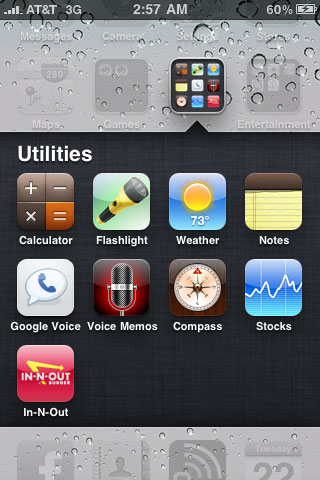 Periodically check the apps your child is using on their device. Remember, apps can also be inserted into subfolders. On iOS devices this function is called “nesting” and on Android devices it is called “stacking.” It is important that you open these subfolders and monitor apps inside each folder. Not checking these subfolders will likely cause you to miss applications installed on your child’s mobile device.
Application Categories to Be Aware Of
As you are looking through the different applications on your child’s phone it will be come quickly apparent that you do not know what everything does. Here are few basic categories to think about.
Internet Browsers – Both iOS and Android devices come with pre-installed Internet browsers. It is important to know that these are not the only avenues to access the Internet. Additional Internet browsers can be installed, such as Dolphin and Atomic. These pathways to the Internet need to be identified.
Social Media – This category includes common apps such as Facebook and Twitter. These apps allow you to connect with others by sharing pictures, posting comments, etc. Snapchat is another example. This application allows people to share photos in a unique way. There are many more applications that fall into this category and it is important that they be identified on your child’s device.
Games – Popular apps such as Angry Birds and Plants vs. Zombies fall it into this category. There are games that will allow you to communicate and play against other people. A game like Words with Friends allows two people to play against one another. Parents need to be aware of games that have a social aspect to them.
Research, Research, and More Research
Once you start doing an application inventory on your child’s device it will become quickly apparent that there are apps that you know nothing about and your child does.
When you run across apps that you do not understand, take the time to do a little research. Search for the name of the application on the Internet and learn about what it is, what it does, and how it is used. You will also run across other helpful information that will better equip you as a parent and allow you to make a judgment call as to whether it is acceptable for your child to use that specific application.
This research will also allow you to have a more informed conversation with your children.
Locking Down Your iOS Device
While the strategies listed above are good starting points, Covenant Eyes recommends you take steps to monitor apps more strategically. To do this, we recommend you take steps to lock down your child’s mobile device.
Step 1: Install an application like Covenant Eyes that will monitor how the Internet is being used.
Step 2: Set restrictions. On your iOS device, turn off the ability for new apps to be installed without your permission, turn off any browsers, and turn off any additional functionality you do not wish your child to have access to.
Locking Down Your Android Device
Step 1: Install an application like Covenant Eyes that will monitor how that Android device is being used. The Android application of Covenant Eyes is different than the iOS version. Installing Covenant Eyes on your Android device will monitor all Internet traffic on the phone’s pre-installed browser and report additional apps that are being used onto the device.
Step 1: Android does not have the ability to disable the installation of apps like iOS devices. For that reason we recommend that you install an app that gives you the ability to password protect specific apps on the phone like the App Market.
Being a parent in the digital age is hard. There is no doubt about it. Luckily, these strategies can be put into effect to help protect kids using mobile devices.






In the past, a single parental control setting on the family computer was enough to keep your children safe and productive.
I think it is necessary to have a monitoring tool on our kids mobile devices. We need to monitor what they are doing because internet is open for everyone and we dont know what they might stumble along the way. Sounds like a creepy parent but i think its necessary since they’re so young.
Actually there are a lot of monitoring apps for the cell phones, but all of them need physical access to the phone and cannot be installed remotely. I read a lot of useful information about mobile application monitoring in this article http://liquidthink.net/mobile-monitoring-applications/.
How can I monitor my child’s iPad in a way similar to History in a web browser. I want to know what Apps he’s been using and when he turns it on and off. Can you help
Hi Maria,
With iOS devices like the iPad, iPhone, and iPod Touch, we currently only monitor what sites are visited through the Covenant Eyes app. We are hoping to develop an all device monitoring solution for iOS in the future but we want to do it the right way, meaning no Jailbreaking or other fishy practices.
I appreciate this post. We are strong supporters of Covenant Eyes. We have been able to help our 20 year old son with CE. The only thing we dislike is Facebook app for Iphone. He was fine with us removing any apps we wanted, and blocking the ability to download apps. If we delete Facebook too, all he would have is a few games and texting. I know how bad FB can be, and wish each page seen on FB could be recorded as well.
Thanks for the suggestion. While we built the Covenant Eyes app to work hand-in-hand with the device’s built-in Restrictions, we knew this had its limitations. Other apps, if they are not themselves safe, can become back doors to temptation. (We talk about that issue in this video.)
We are working on other possible solutions for iOS users, and I’ll pass your thoughts along to our developers.
It never ceases to terrify me how “parenting” gets equated with “restricting” “controlling” “monitoring” etc…
when it seems that things like “communicating” “interacting” and “understanding” are so much more effective, and realistic, especially in this context. Kids are going to do what they want to do, eventually, somewhere.
Might not be much more than a waste of time to use things like this that only postpone this – and facilitate rebellion or backlash.
We agree! We just believe that monitoring – more specifically, a weekly Accountability Report – should be a tool to facilitate the conversation.
We also strongly believe that kids should be protected from a young age, and that parents should update their child’s settings with their child. A 5-year-old, for example, should use a pretty restricted filter – you don’t want your very young child to stumble on porn at all, and they’re not even necessarily going to be able process content on news/tabloid sites. As the child ages, restrictions should be removed progressively. By high school, some parents may even want to allow their teen to choose whether or not they want to be filtered anymore, and may want to send their teens their own Accountability Reports, to show that these conversations are meant to be two-way streets.
If this software requires a Apple ID if my daughter changes the Apple ID linked to the survalince acount will it terminate the software or will it transfer to the new account.
The only thing the Apple ID is used for is to purchase the app. If our app is already downloaded on a device, and you change the store Apple ID on that device, it doesn’t remove apps under the previous ID.
I am not sure the above is enough.
This situations and Apple’s behavior here are unacceptable. There is a description here that describes the problem – and there might be an answer, too: http://www.change.org?
https://www.quora.com/Apple-Inc-2/How-can-we-motivate-Apple-to-close-an-open-hole-in-the-iOS-parental-controls
Correct. The solution at the moment is to lock down the ability to install apps.
I think it is pretty lame that Covenant Eyes doesn’t make a bigger deal about being able to access any site you want via browsers built into other apps and it can’t report on this.
Parents Beware!!! Any 10 year old kid can get on most any app on their android or ios devise and look a porn and you will never know.
Covenant Eyes you are supposed to be the leader in this and help us out with this. Where are the warnings on your site? Why is there not a list of safe apps that will not give you unmonitored access to the web? This should be mentioned everywhere!
Scott McClurg obviously doesn’t struggle with looking at pornography or have kids that he is trying to protect, otherwise he would have mentioned this in his article about monitoring your kids device.
Maybe SafeEyes will do a better job at this.
Perhaps. I haven’t heard much about SafeEyes since they closed their offices last month. Have you heard anything?
Like I mentioned, we have some great discussion going on right now about built-in browsers and some running lists people are compiling. Do you have any you know we should be aware of?
Maybe if they weren’t sitting on their lazy buts, raking in the money that parents pay for this app, that doesn’t work, they could be making a better version.
Another thing to be aware of is that apps other than those labeled ‘browsers’ can have browsers built in– sometimes in help/legal/login pages, sometimes via advertising links.
Yes, build in browsers need to be monitored as well. We have a whole discussion about that topic on our GetSatisfaction forum. I recommend you check it out!